As we explained in our article on the prerequisites for personalization with Marketing Automation, personalization is now a key component of the best marketing strategies.
After segmenting your database, identifying your personas and defining your customer journey, you are ready to use the different features of your Marketing Automation tool!
-
Custom fields
The first thing to do when getting started with your Marketing Automation tool is to define custom fields. These correspond to the information about your contacts (last name, first name, phone number, age, …) or their company (revenue, number of employees, customer status, …).
When you create a campaign, insert information about your customer to show that you know them. Using their first/last name is now practically standard (make sure your information is accurate, by the way), but why not use location fields, their birthday, or information about their latest purchase?
“Emails with a personalized subject line generate an open rate that is 50% higher.”
-
Channels
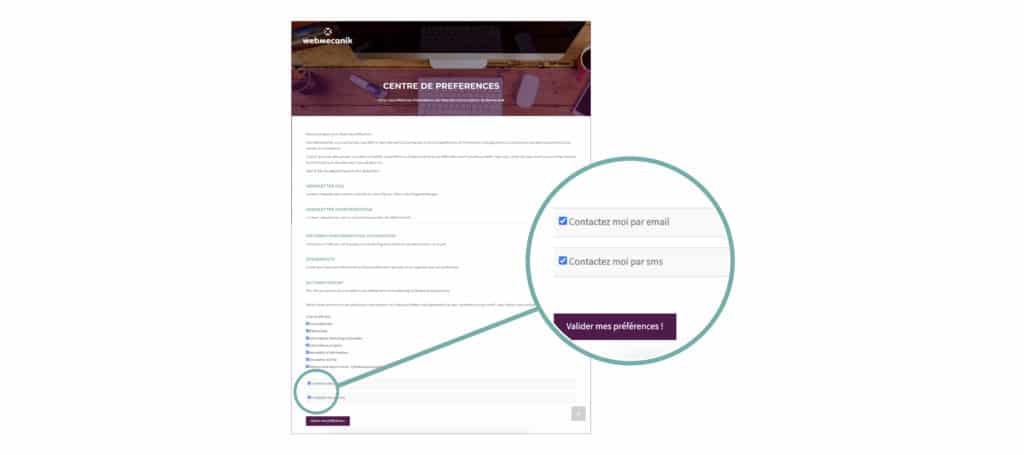
Today, the multiplication of communication channels allows you to deliver your messages in the best possible place for your customers. Emails, SMS, notifications or social networks, it is possible for you and for your contacts to choose their preferred channel for being contacted. Taking your contact’s choice into account will allow you to give them a personalized purchasing/loyalty experience (and as a bonus, show them that you respect the GDPR 😉 )
-
Context
One way to personalize your communications is to focus on your customers’ availability to receive your information. Indeed, thanks to your Marketing Automation software, you can send your campaigns according to location, the device used, or even according to your contacts’ best opening times.
Depending on your contact’s time zone, you can personalize the message, its language, its reception time… A welcome touch to avoid sending emails at night or follow-ups during the weekend!
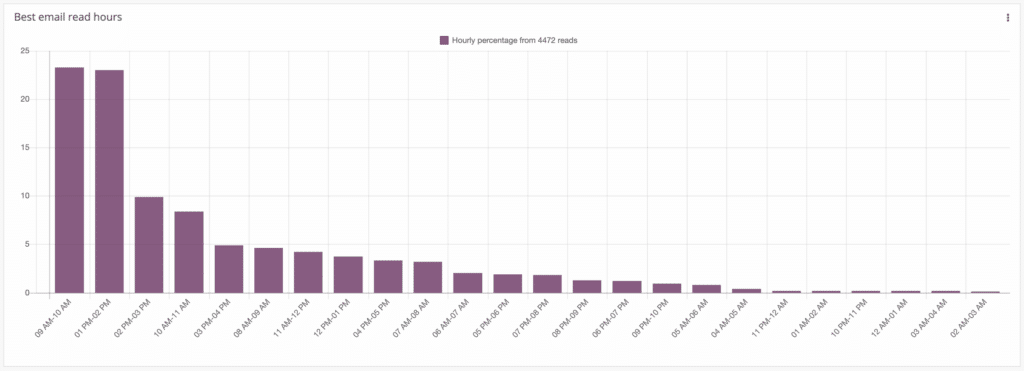
Your marketing automation software can even give you insight into the opening times of YOUR contacts. Forget “best practices”, use the time slots that work for YOUR database.
Example with the “Best email read hours” widget integrated into our Marketing Automation software:
-
Dynamic content
Dynamic content is a feature of your Marketing Automation software that allows you to create variations in the blocks of your emails or landing pages. Depending on the information about your contact (postal code, type, points, …), you can change the content of your block. An ideal tool for personalizing your messages, without having to recreate as many emails as you have customers!
Example of dynamic content highlighted by our account manager Aymeric:
:urne_avec_coche::urne_avec_coche:The perfect example of #MarketingAutomation: automation and personalization! :flic::ouvrier_en_bâtiment::femme_médecin::étudiante:
Recently, EDELIS set up a campaign to revive the company’s sales activity by creating emails integrating DYNAMIC CONTENT! :fléchette:@Webmecanik_FR pic.twitter.com/JZtX2i21rr
— Aymeric FRANÇOIS (@AymericFrancois) July 30, 2020
-
Landing pages
If the personalized message attracts attention, it is necessary to not forget to personalize the landing pages your contacts arrive on. What could be more frustrating than clicking on a “Buy now” Call To Action and ending up on the home page?
To go further, you can highlight different content or design on landing pages depending on the campaigns and the chosen segmentation. You will confirm to your contact that you will know how to meet their needs and will then have a better chance of accelerating their progression in your conversion funnel.
The goal of personalization is to give your contacts the best possible experience. In recent years, this has been at the heart of the most innovative marketing strategies and is leading companies to put people back at the heart of their business.
Personalizing is important, but often time-consuming and requires suitable tools. With the right marketing automation tool, personalizing your communications is simple and effective!