At Webmecanik, we’re proud to take part in the Email Expiration Date initiative, led by Zero Carbon Email. This collective project aims to reduce the carbon footprint of the email marketing industry by limiting the storage duration of emails that have become obsolete in inboxes.
It is in this spirit, in line with our CSR efforts and our approach toward the Responsible Digital certification, that we integrated this new eco-responsible standard. It allows you to set an expiration date for your emails.
Why add an expiration date to your emails?
Every day, billions of emails are sent, but very few are deleted. Most remain stored for years on messaging servers, even though more than 99% of opens and clicks happen within 48 to 72 hours after sending.
Expired promotions, flash sales that are over, outdated information: a large share of emails (transactional or marketing) are no longer useful after a few days, but they continue to consume energy or unnecessary storage space.
By adding an expiration date to your emails, you allow messaging services to automatically delete these emails once they’re no longer useful. A simple action, with a direct environmental impact. 🌱
How does it integrate into Webmecanik Automation?
You can now set a lifespan for each of your emails directly from Webmecanik Automation. By default, it’s set to 365 days, but you can change it depending on your needs—whether it’s for a one-off send or an automated email. Once the lifespan is reached, the message can be automatically removed from the recipient’s inbox, if their email client allows it (👉🏻 list of participating messaging providers; the more we use it, the more it will motivate people to join the movement).
Available format: relative duration (e.g., 3 days after sending).
A global parameter, configurable at the instance level, sets a default delay of 365 days for transactional and marketing emails.
ℹ️ As part of our CSR approach, we’ve also rolled out this feature across all our internal technical emails (password resets, notifications, etc.) so we can fully act as active participants in this initiative.
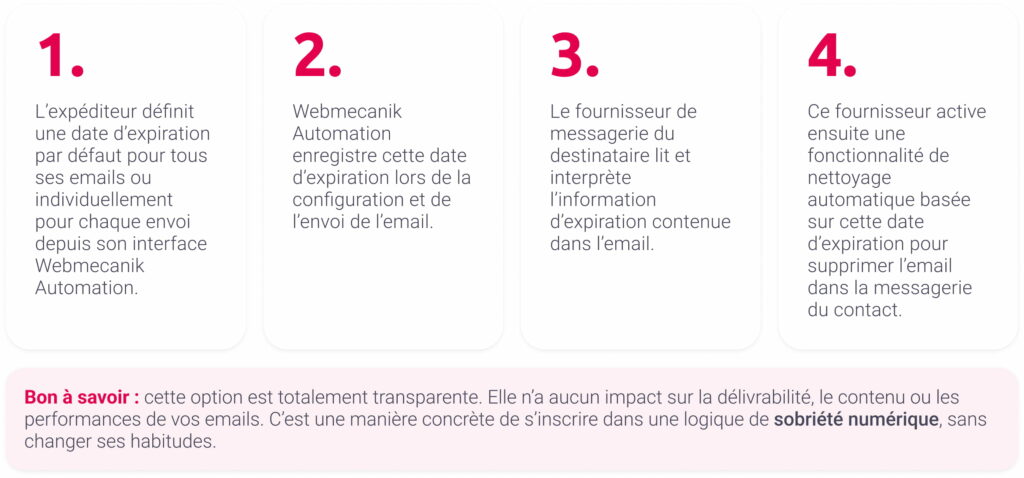
It’s a simple gesture, but with a significant impact: once the date is reached, expired messages will no longer be stored unnecessarily in data centers—thereby helping to reduce the carbon footprint of your campaigns.

For the more curious who want to know what’s really behind this feature, it’s quite simple. An email’s expiration date is set directly in its header.
In practice, all you need to do is add this line when sending:

So, the messaging providers that host emails in the cloud (Gmail, Outlook, LaPoste, etc.) recognize this instruction and automatically schedule the message’s deletion on the specified date.
📄 Learn about the detailed operation on the official IETF standard – Email Expires
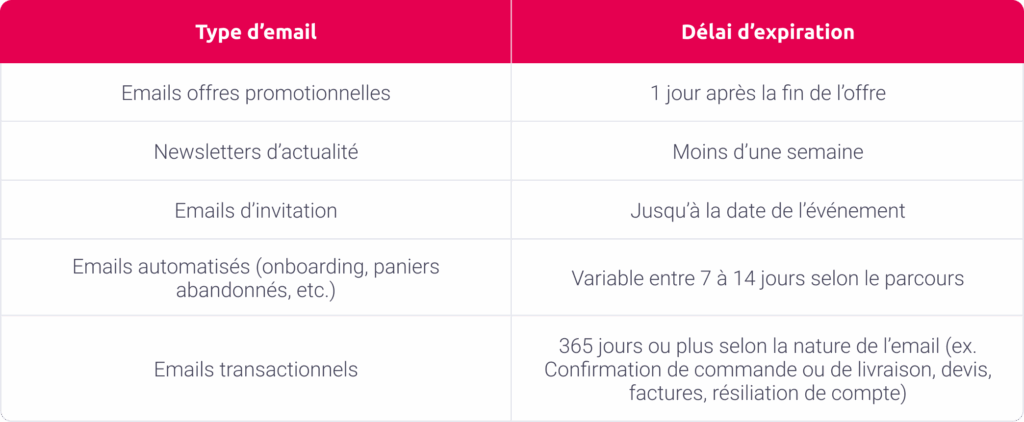
Our expiration recommendations by email type
Each type of email has its own lifespan, tied to its nature and relevance to the recipient. That’s why it’s important to adjust the expiration duration based on the content and the goal of each message. For example, a promotional offer quickly becomes obsolete after its end date, while a transactional email, such as a password notification, needs to remain accessible for longer.
The goal is simple: keep emails only for their period of relevance, to optimize their impact while limiting their environmental footprint.
Why support and adopt this initiative today?
environmental impact. That’s why we integrated the email expiration feature into our solution, so you can make your email campaigns more responsible.
In a context where environmental awareness has never been stronger and regulations are tightening, adopting responsible digital practices is no longer an option, but a strategic necessity. By enabling this option, you gain several key benefits:
- Affirm your CSR leadership: show your customers and partners that you’re committed to an eco-friendly approach. A major asset for your brand image.
- Reduce your email carbon footprint in concrete terms: by limiting unnecessary email storage in inboxes and data centers, you actively help reduce energy consumption. It’s a simple action that, across your campaigns, represents substantial savings in carbon footprint.
- Enjoy a transparent, no-burden solution: far from being an extra burden, this feature is easy and intuitive to integrate into your existing processes. It has no impact on deliverability, content, or campaign statistics.
With Webmecanik Automation, align your marketing with your ecological values and those of your customers. Commit to more responsible, high-performing, and sustainable marketing.
To learn more about this project, visit Zero Carbon Email