I am pleased to inform you that we have launched a new feature in the responsive drag & drop email editor of your Webmecanik Marketing Automation software. You can also learn more about Newsletter: the metrics you need to know.
Email spam?
With a single click, you can have your email evaluated. The verdict is instant: your email is considered spam, or not. It’s up to you to modify your email before it’s too late!
Your entire email content, namely the subject line, text, images, and HTML structure, will be evaluated across multiple dimensions in order to compare your message to the characteristics of an email considered spam by email clients. One single goal: avoid getting blocked by anti-spam filters!
A trusted test
Rather than creating a technology from scratch, Webmecanik chose to integrate SpamAssassin, the number 1 open-source anti-spam solution.
This new tool integration into your Marketing Automation software gives you access to a quality service at the heart of your marketing tool. It also ensures that you benefit from the latest techniques and updates in the field of email anti-spam.
Test without limits, it’s free!
It’s simple and fast. One click and you have the result. Use it as much as you like, until you get a satisfactory result.
As you have come to expect from Webmecanik, this new feature will cost you nothing.
Let’s run a test!
At any time while writing your email, you can check its spam level by clicking at the top of your page on “Is it Spam?“.
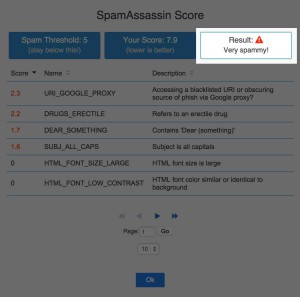
SpamAssassin handles the test for you and the result quickly appears in your browser:
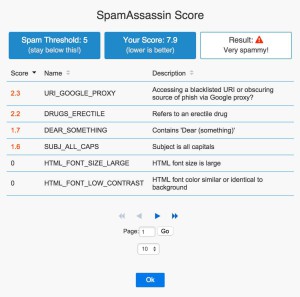
Understanding the spam test result
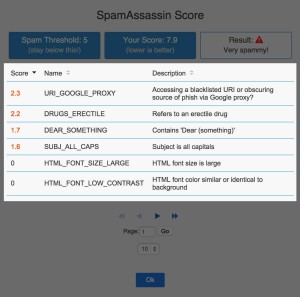
The test result clearly shows you where the errors are and how much each of them costs you (in points). The goal, of course, is to create an email with 0 points!
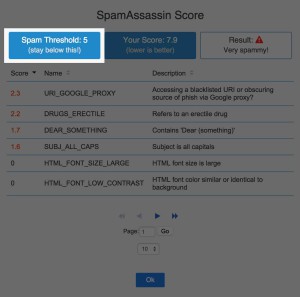
“Spam Treshold” : of course, the goal is 0. What SpamAssassin tells you is that above 5 points, you will be considered spam. That is the limit you must not cross:
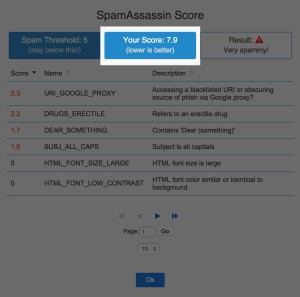
“Your score” : This is therefore the total of your points established by the 712 tests carried out by SpamAssassin.
“Result” : The verdict based on the number of points in your score. Your email therefore falls into one of the following 4 categories:
- 0 points : Not spam
- 0.1 to 2.5 : Slightly spammy
- 2.6 to 5 : Rather spammy
- >5 : High-quality spam…
Let’s be clear, a score of 0 does not guarantee that the email will not be marked as spam. There are many anti-spam filters for email clients. On the other hand, since SpamAssassin is the leader (and therefore the most used by email clients), that guarantees us the best level of quality.
Under the displayed results, you will find a table summarizing the different tests that you failed. SpamAssassin explains what it considers to be the cause of the spam classification. This will easily allow you to try corrections and re-test your email to see whether it has an impact!
Also read: How to read marketing email statistics with robot (bot) behavior?
Also read: The best tips to improve your email deliverability!
Ensure the highest level of deliverability!
The new anti-spam testing tool that Webmecanik now offers will help you build better emails and ensure maximum deliverability. It’s easy, in one click, all you have to do is log in to your account and test your emails!
Learn more about Marketing Automation, receive our white paper.