
What to take away from the “2019 State of Email Workflow”?
As every year, Litmus shared its report on the state of email. The 2019 State of Email Workflows provides a roundup of email clients’ market shares, emerging platforms, the latest updates, topics such as security and privacy, as well as the challenges you should expect in 2020
Here are the key figures and pieces of information that we think are worth extracting from this report.
Creating an email takes more time than you think
Indeed, while the action itself seems relatively simple and many tools help us produce our email campaigns, it’s highlighted that an email isn’t made in a single day.
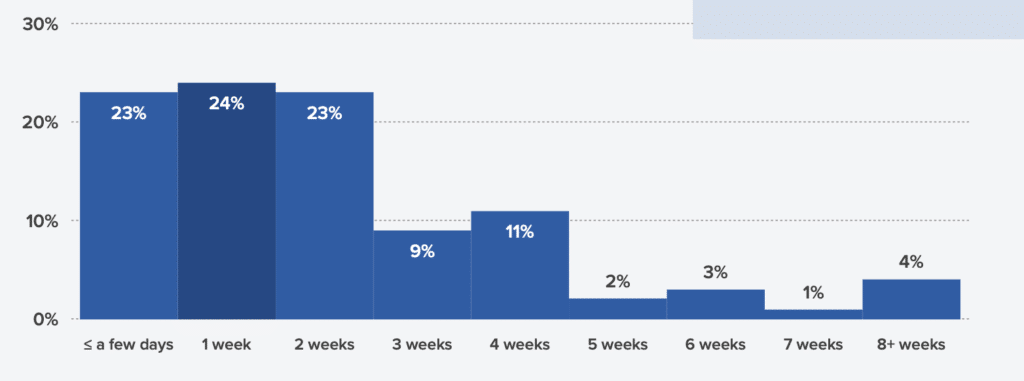
- Length of the email production cycle (from the start of brainstorming or design to sending it): 77% spend more than a week preparing it, 21% more than a month!
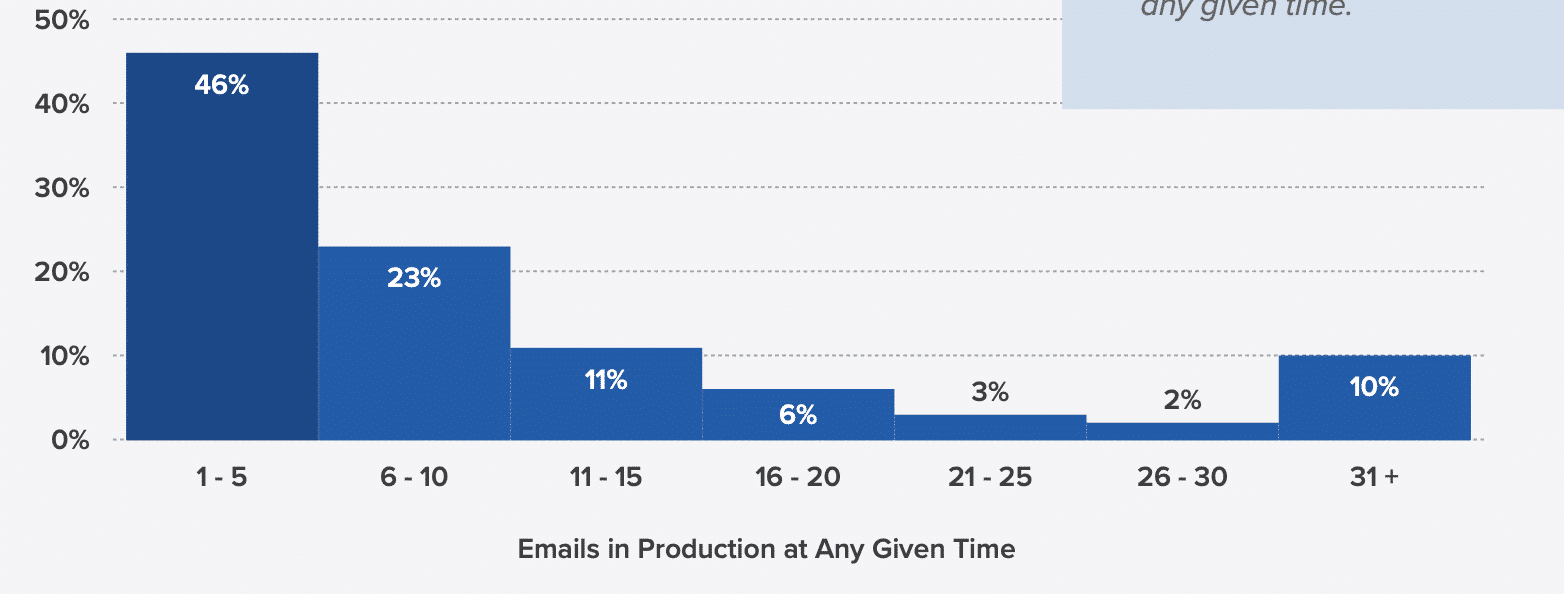
- Number of emails produced simultaneously: two categories can be distinguished—very small businesses (TPE) prepare between 1 and 5 emails, whereas SMEs/ETIs and large groups prepare more than a dozen.
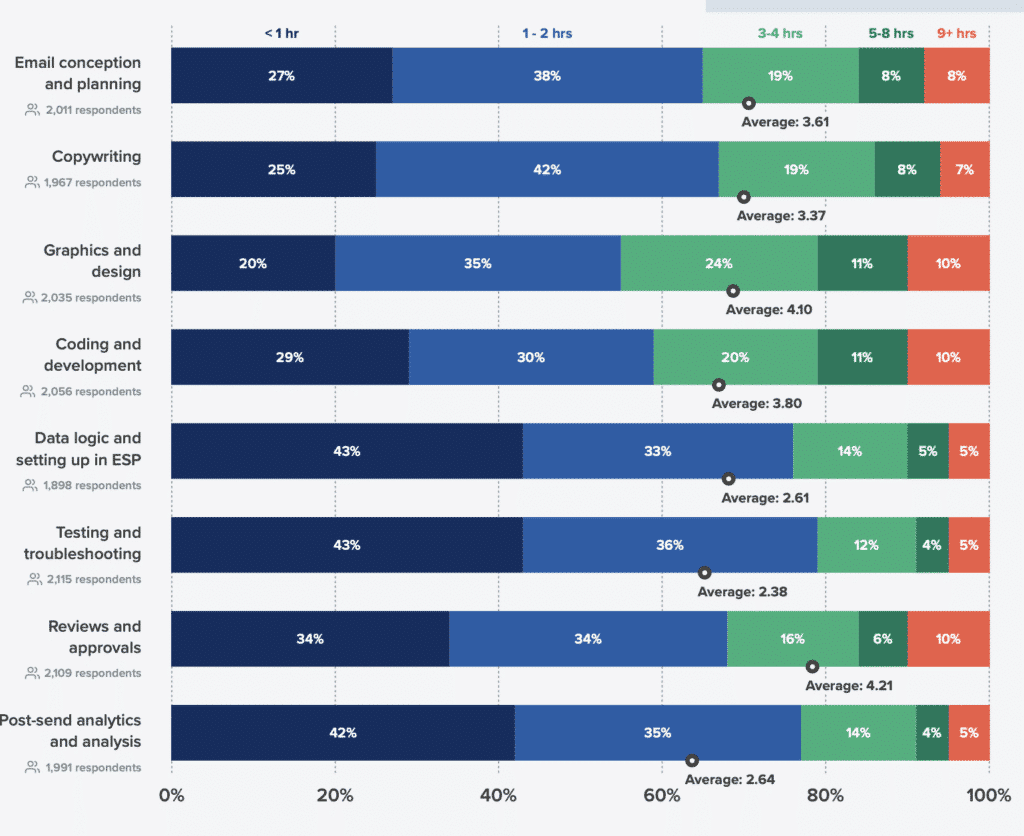
- Tasks taking the most time: getting the email validated is the most time-consuming. But it’s also worth noting that paradoxically—despite the many tools available to help you—it’s still HTML integration (code development) and creating the design that take a lot of time.
Defining and implementing a process before sending your emails is essential
Every year, it becomes increasingly difficult for a brand to be heard amid the sheer number of ads and messages filling subscribers’ inboxes. So what will set you apart from the hundreds of emails in your recipients’ inboxes? If you want your email campaigns to drive your actions, you need to send targeted and effective campaigns. And for that, you need a pre-send process—which will indeed ensure high-quality results.
So how do companies manage the workflow before sending, and what tools do they use to do it? From content planning and writing to design and coding, preparing an email involves a multitude of steps, tools, and people involved. An effective email pre-send process helps projects move forward quickly and defines the role of each stakeholder in delivering the project.
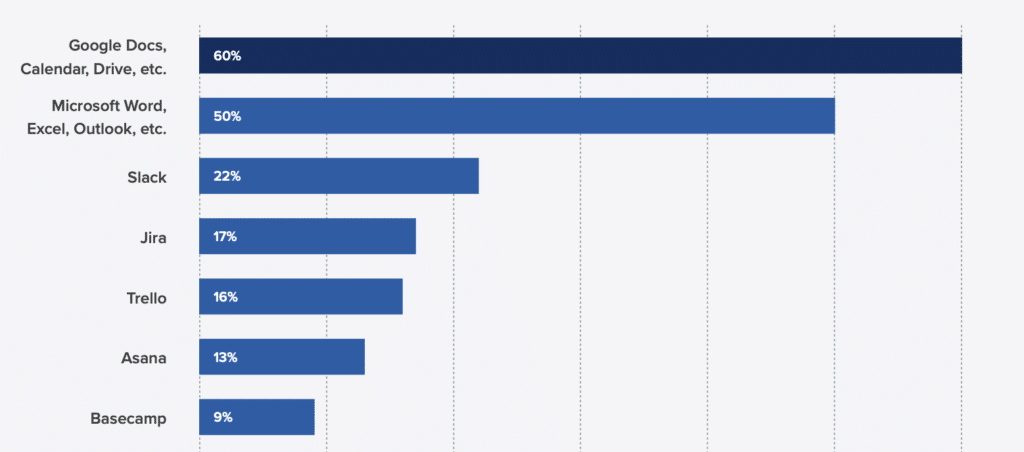
- Collaborative tools: it’s mostly the Google and Microsoft office suites that are used. Note that chat (Slack) and collaborative project management tools (Jira, Trello, Asana, Basecamp) are also widely used in business settings.
- Preparation lead time: over 70% of companies start less than 2 months in advance, which logically corresponds to the production lead time described earlier in the study.
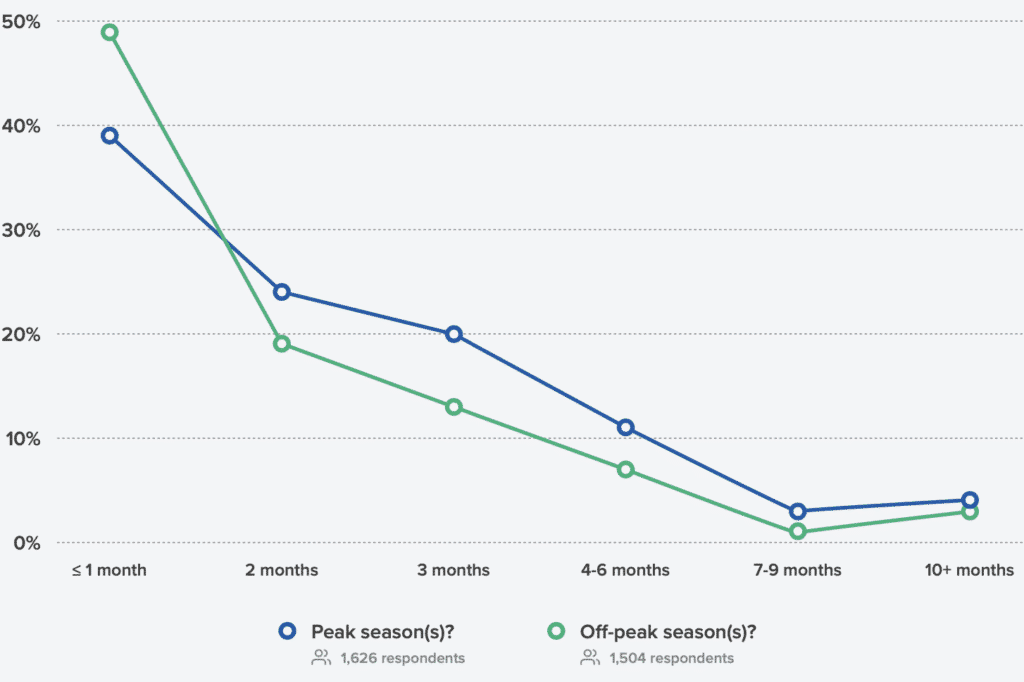
But does your team need to create an editorial calendar? We think it does. Every team, regardless of its size or the complexity of its email campaigns, should first define its strategy and objectives, and then create an editorial calendar that will enable it to meet those objectives. Campaign calendars help all team members plan their time more effectively and make it easier to align email campaigns with other marketing channels. However, the level of detail and progress of your content planning depends strongly on your team’s unique setup. Is your team small and projects evolve quickly? A simple spreadsheet covering the next 2 to 4 weeks is enough to keep your team on track. Larger teams juggling multiple complex campaigns should benefit from more advanced content planning and project management software.
Does your company define in advance the objectives, the target audience, the message, and the KPIs for your emails?
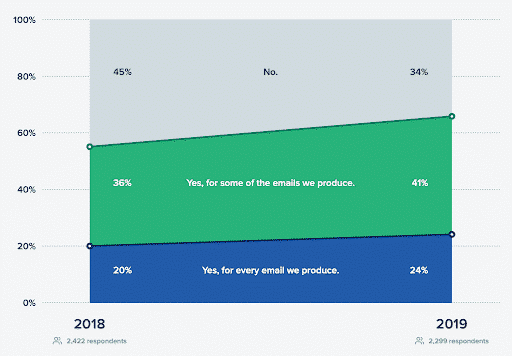
Far too few marketing teams ask the right questions before moving on to the implementation phase. Indeed, only 24% of respondents say they define the objectives, target audience, message, and KPIs to analyze before sending their emails. 34% of respondents say they never do it!
Defining the goal, the message, the timeline, the key performance indicators, and other important details ensures that all stakeholders agree on the campaign’s objective and action plan. This keeps team members on track and improves the future quality of the next emails.
What share of your sent emails include an A/B test?
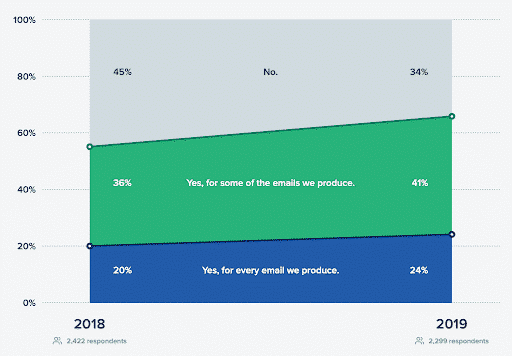
63% of respondents say they use A/B testing at least sometimes for their emails. This figure is quite high, even though 75% of respondents do not set—or rarely set—objectives for their emails. Companies seem to put the cart before the horse!
To create effective email campaigns, you need to keep improving continuously, and there’s no better way to learn quickly than A/B testing. We recommend giving your teams the time and resources they need to implement A/B tests, at least for your most crucial campaigns. Indeed, sometimes even a small change can shift results.
Does your company follow a style guide to design your emails?
66% of the marketing players surveyed follow a style guide to create their email campaigns. This figure is up compared to 2018. Having a style guide, along with templates, makes it easier and faster to create emails and ensures a more consistent user experience across all campaigns. If you haven’t defined a style guide for your email campaigns, we recommend making it a priority for your team.
How often do you test your automated emails to improve them?
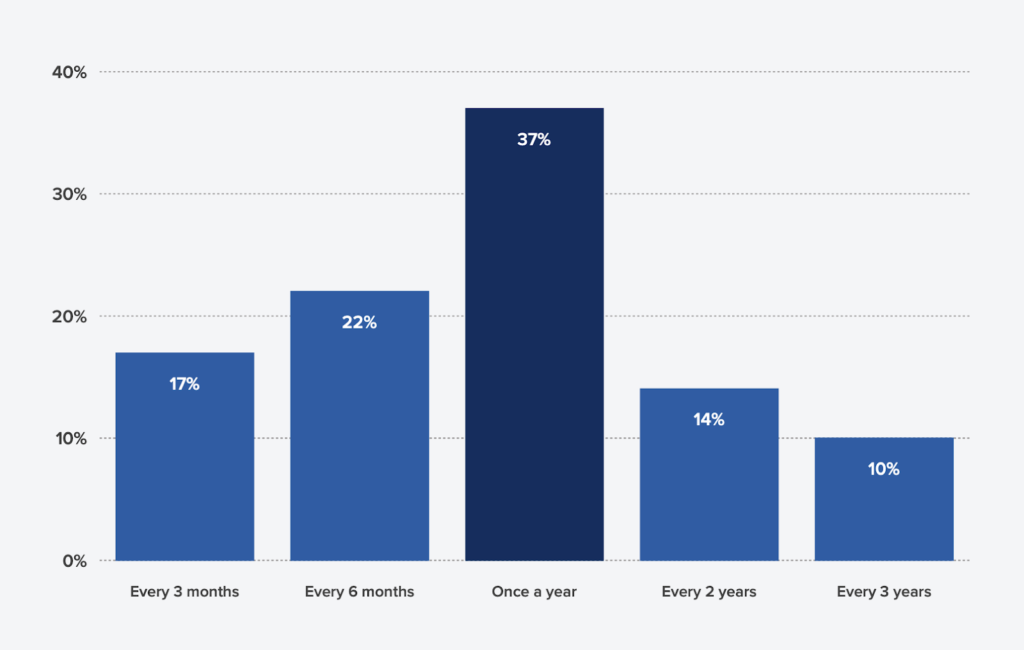
For the majority of the marketers surveyed, automated emails are reviewed on average once a year. This is a dangerous approach. Indeed, email solutions modify how HTML is handled without notice, so an email that seemed to work yesterday could be broken today. Anti-spam filters constantly change their algorithms, and an email that always arrives in the inbox can suddenly be marked as spam and never be seen. That’s why no email should be sent without a thorough review carried out more than 3 months ago.
Generally, how many people do you have test and approve your emails before sending them?
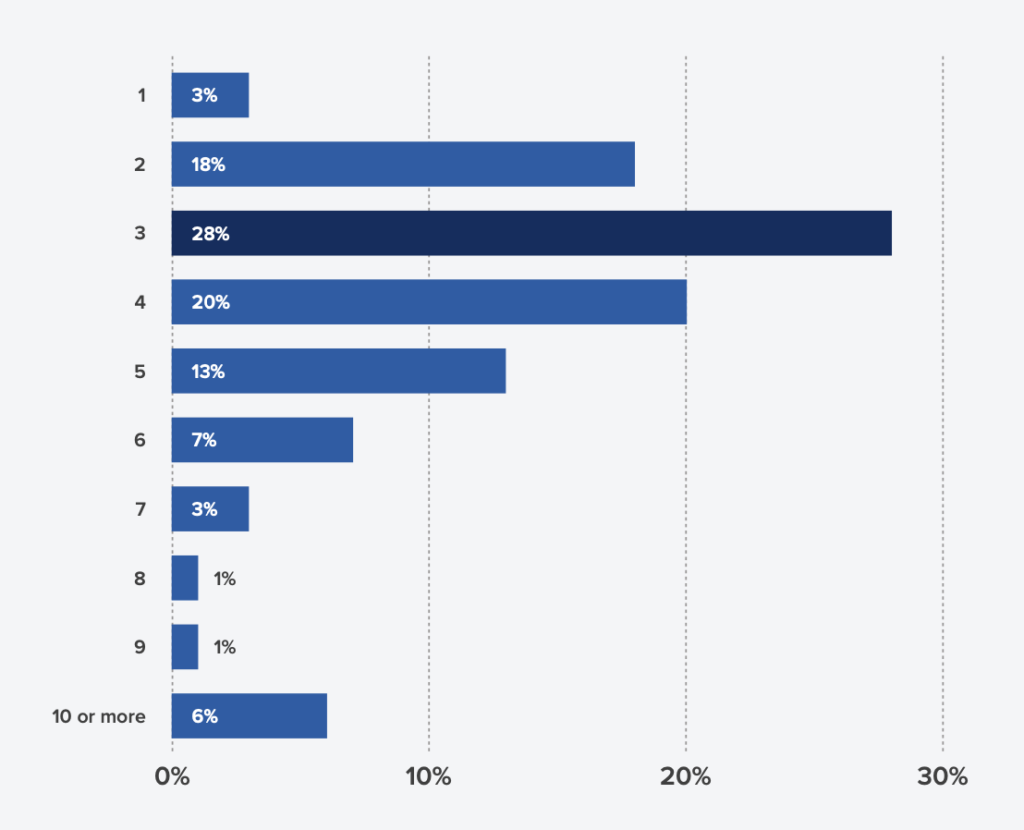
Most companies involve 3 people in the process of testing and approving an email. Again, this depends on the size of the company: for a small business, 3 people are more than enough to test and validate emails. However, be careful with large organizations that involve a large number of people, as this can complicate the testing process. In addition, data shows that having senior executives involved in email validation generally slows down the process. If possible, we recommend not including leadership in daily email testing and approval; instead, involve them in the overall campaign strategy and objectives.
Emailing remains a heavily used channel for a majority of companies
How important is email marketing to your company’s overall success?
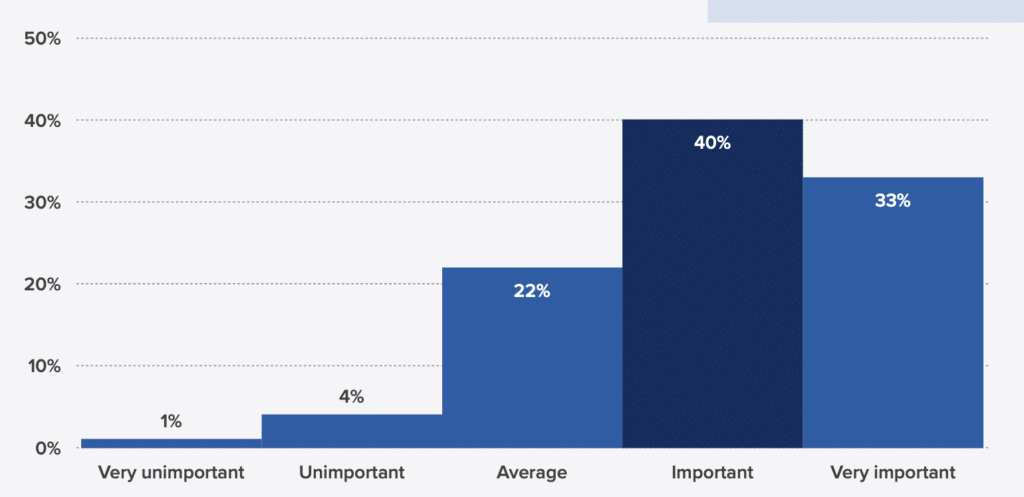
For 73% of respondents, email marketing plays an important role in the success of their company. So make sure you regularly share, with your teams, your wins and what you’ve learned from them—whether through a newsletter note, a slide deck, or a spreadsheet that presents key performance indicators.
Don’t forget that what you learn about your subscribers can also be extremely valuable to other teams. Always share your knowledge. Did a topic trigger more opens than ever? Did a message in your newsletter get more clicks than any other content? Share it with your content team, which can then improve future content.
In conclusion, for each of your email campaigns, define your strategy, your style guide, and determine a clear process to simplify and speed up the implementation phase of your emails. For each email, don’t hesitate to set up A/B tests, with the goal of always improving. And finally, never forget to always test your emails before sending them; for that, we recommend choosing in advance the people responsible for the tests, and using a collaborative tool to make it easier to manage all the changes.