You probably already know this: in B2B, every interaction matters! A good marketing workflow not only saves time, but above all turns interest into engagement… then into sales. ? Of course, there are many workflows to help you turn these leads into customers: the classic sales workflow, the onboarding campaign, customer support, events, social networks, a properly configured chatbot, or even an ambassador campaign. What if your campaigns could go even further? Imagine intelligent scenarios capable of automatically adapting to each contact at the most opportune moment. ? I’ll tell you more below!
Social networks as a sales machine
The sales workflow
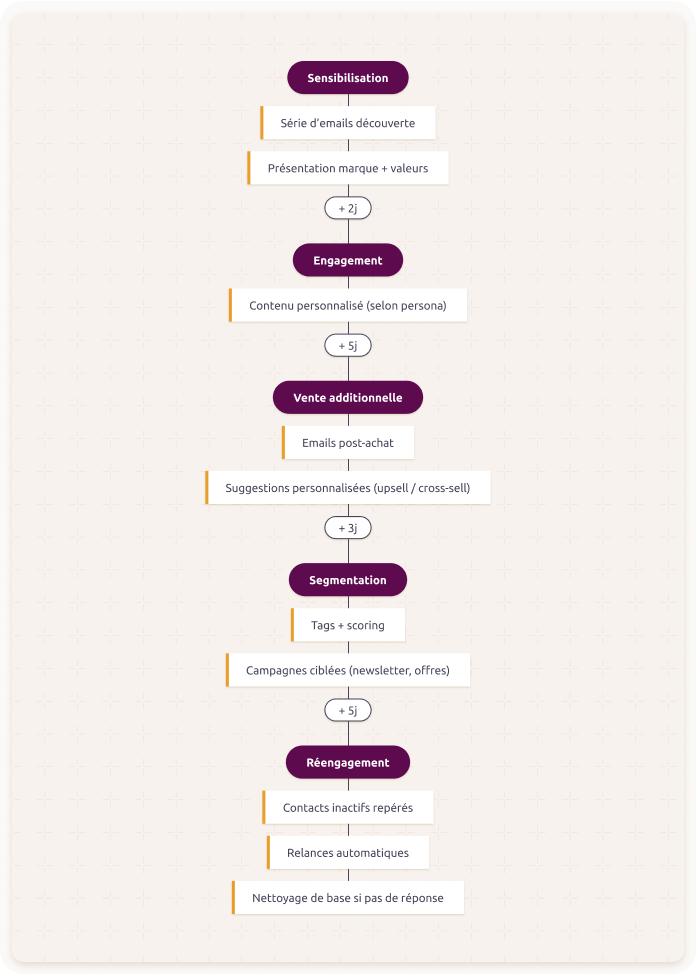
Selling effectively in B2B relies on a structured strategy in two steps: the “sales machine” and the “invisible sales machine”. The sales machine includes your web pages, marketing resources, publications, etc. The hidden part (invisible sales machine) is your marketing automation tool. It’s this tool that lets you set up the 5 steps I’m going to present: Awareness, engagement, additional sales, segmentation, and finally re-engagement.
Phase 1 – Awareness
The goal here is to grab the prospect’s attention, present who you are, your values, and start building a relationship. You can use drip marketing, meaning a series of emails planned to introduce your brand.
Phase 2 – Engagement
This is where you create interactions with your visitors. This phase prepares for sales by offering personalized content based on the persona you’re targeting. The duration of this step depends on the buying cycle: the higher the average cart value, the longer the phase (of course, to be adapted to your line of business). The objective here is to help your prospect identify their needs and see how you can meet them. The engagement phase serves as a foundation for moving into a sale.
Phase 3 – Additional sales (upsell / cross-sell)
Once the sale has been completed, it’s time to increase your customer’s order value. How do you do that? By creating a strategy in post-purchase emails, for example: suggestions for complementary products, premium offers, additional services… You can fine-tune your suggestions based on behavioral data (product already purchased, what they viewed, etc.). Thanks to this information, you make more relevant recommendations and maximize your chances of an additional purchase.
Phase 4 – Segmentation
As briefly mentioned in the previous phase, information about your contacts is valuable data. This data allows you to segment your contacts. With this segmentation, you can create “broadcast” campaigns. These are one-off sends such as a newsletter, a special offer, etc. It’s more targeted than a classic automatic sequence. The idea is to send each segment a message tailored to its maturity level, needs, or profile.
To optimize your segmentation, use tags or even scoring. The goal of this phase is to offer the right content to the right person at the right time. ?
Phase 5 – Re-engagement
Not all of your contacts will stay active all the time. Over time, some stop opening your emails or clicking on your content. That’s normal, but you shouldn’t ignore it. The re-engagement phase helps you identify inactive contacts and send campaigns to bring them back. And if it doesn’t work, you can remove them from your database. This helps you keep a clean database, achieve better open rates, and avoid sending emails that will never be read. You can automate this step. For example, if a contact hasn’t opened any email in 6 months and doesn’t respond to two follow-ups, they can be moved to a separate list or deleted.
The onboarding campaign
Congratulations on this workflow—your lead has become a customer! But the experience is just beginning. The onboarding scenario helps guide the customer’s first steps so they can quickly extract value from your solution. This moment is key, because that’s often where the perception of the promise being kept… or not is decided. ?
In B2B, onboarding is especially important for complex solutions or SaaS-style offerings, with a trial period or a subscription. It helps avoid drop-offs linked to poor onboarding, strengthens retention, and reduces pressure on customer support. The goal isn’t only to deliver a product, but to make the customer competent and autonomous by providing a smooth, personalized experience. This involves educational content, progressive follow-up, and human interactions to reassure.
The customer support campaign
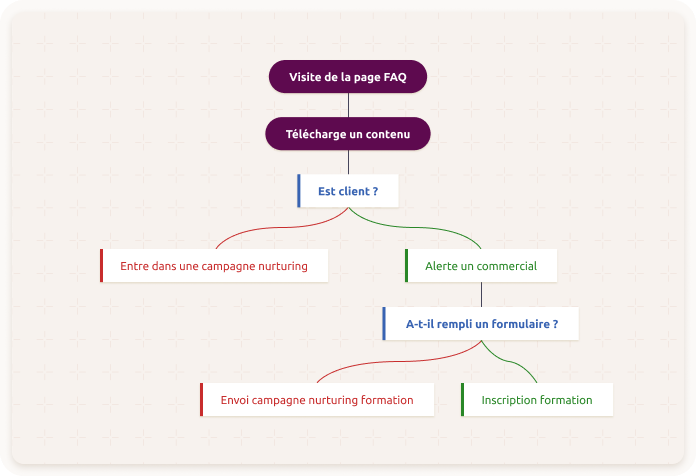
This scenario allows you to automate part of customer onboarding and support. The idea is to stay responsive even without immediate human intervention. You save time and your customers feel better supported. Start by integrating a knowledge base into your tool, website, or other platform (FAQ, tutorials, videos, articles). This enables customers to find answers quickly without having to contact support every time. You can also automate answers to frequently asked questions using predefined emails or messages, sent according to customer actions (ticket opened, search in the FAQ, etc.). Also consider setting up follow-up after resolution: a short message or a satisfaction questionnaire sent after a ticket is closed, for example. This shows that you’re listening and looking to improve. ⭐
The event campaign
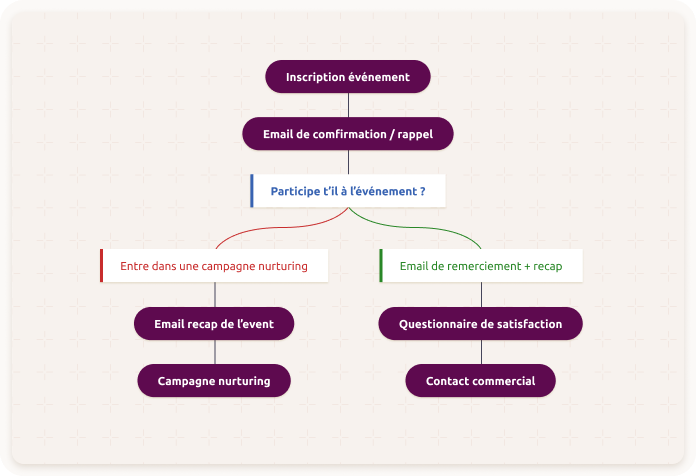
Organizing an event—online or in person—is a great way to generate qualified leads. But for it to be truly effective, you need to manage communication before, during, and after well. That’s where a marketing workflow makes all the difference. You can automate key steps: sending invitations, reminders for registrations, confirmation of attendance, and reminders before the day of the event. This helps you avoid forgetting important steps while keeping a constant connection with your contacts.
After the event, keep the relationship going. Send a thank-you message, a recap of the highlights, or a replay if it was a webinar. This is also the right time to propose bonus content or an offer reserved for participants.
?Also remember to segment your contacts based on their behavior:
- Those who registered but didn’t show up.
- Those who attended.
- Those who didn’t respond.
You can then tailor your messages to each group—for example: follow up with no-shows, send an offer to attendees, or propose another event to those who weren’t available. The goal here is to create a smooth experience, stay in the mindset of the participants, and maximize commercial outcomes after the event.
Social networks as a sales machine
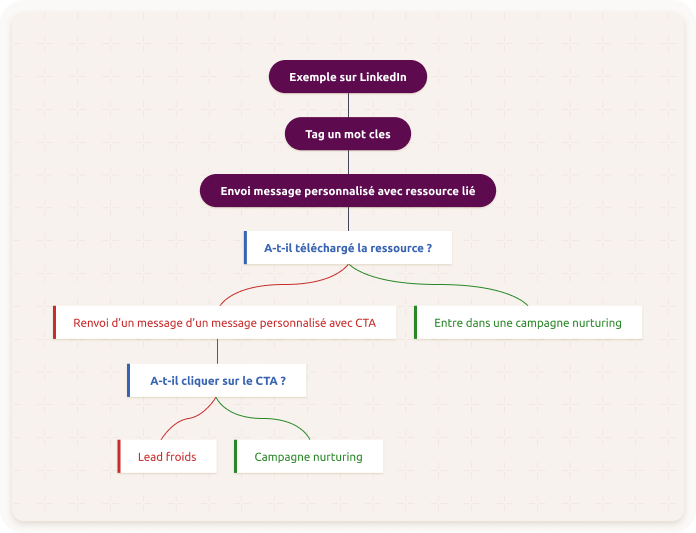
Marketing automation isn’t limited to emails, SMS, or landing pages, it can be a real support for your social media strategy. For example, you can send targeted emails to invite your contacts to follow your pages, like a post, or sign up for a live session. It’s a good way to connect your channels and strengthen your online presence. You can also set up retargeting campaigns. If a contact becomes inactive in your emails, you can reach them through ads on Facebook, Instagram, or LinkedIn. This allows you to re-engage cold contacts. ?
The chatbot as a scenario
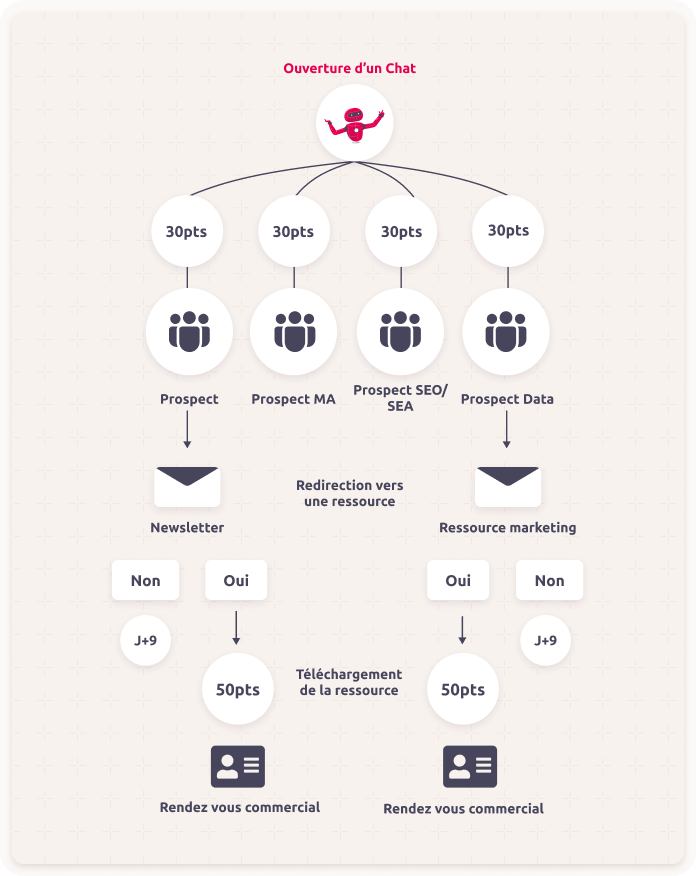
A well-configured chatbot can become a real asset for your lead generation. Available 24/7, it can welcome your visitors, answer their initial questions, and above all qualify leads in real time.
Depending on the answers provided, it can direct each prospect to the right resources: a white paper, a demo video, an FAQ, or even scheduling a meeting with a sales representative if the need is already clear.
The big advantage is that everything happens instantly and smoothly, without human intervention at every step.
You can also connect your chatbot to your marketing automation tool to segment leads based on their responses, areas of interest, or maturity level. With a lead scoring system, you can more easily identify the “hot” contacts to prioritize.
The goal of this phase is to create a smooth experience for the prospect, better-targeted lead generation, and more conversions—while saving time for your teams.
The ambassador campaign
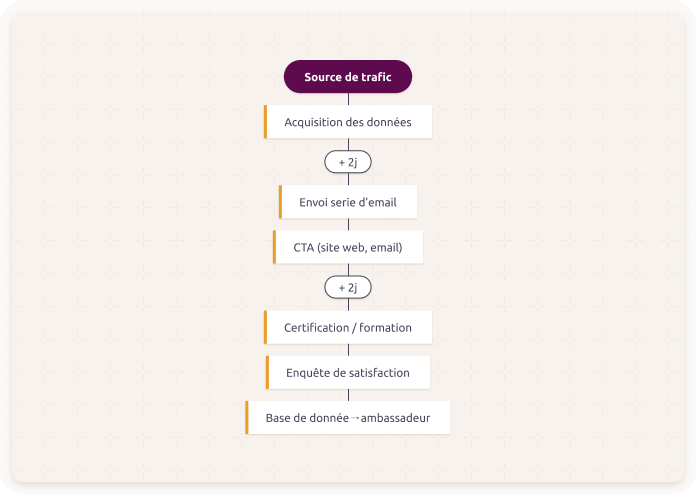
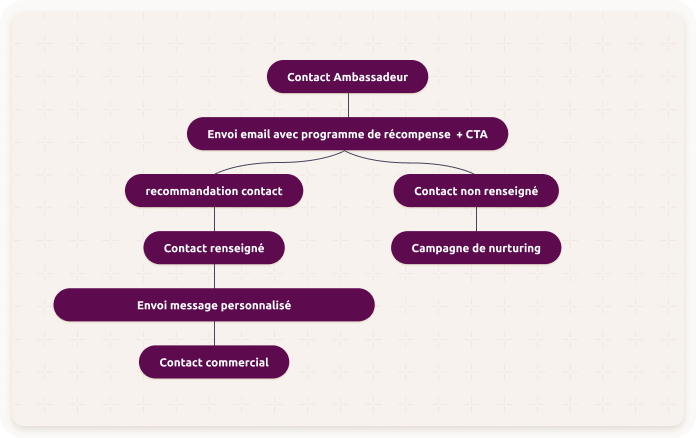
A satisfied customer is good. A customer who recommends you is even better! Your clients can become your best ambassadors, as long as you give them the right tools and a clear framework. With an ambassador or referral program, you turn their satisfaction into a true growth lever. The idea is simple: encourage your customers to talk about you, share their experience, and recommend your products or services around them. Provide ready-to-share content (links, messages, visuals), and set up a motivating rewards system: gift cards, access to exclusive content, discounts, etc.
You can also segment your ambassadors based on their level of involvement:
- The relays: those who share your content occasionally.
- The active ones: those who regularly talk about you, generate leads, or drive sales.
Remember to track results: number of recommendations, conversion rate, sales generated. This helps you identify your best ambassadors… and take even better care of them.
Go further with intelligent campaigns
What if you could go even further with your campaigns? Thanks to our artificial intelligence, that’s now possible!
It all started with our email sending feature at the ideal time for each contact. This option has proven itself with +8 points in open rate on emails. So we decided to go even further by creating “intelligent campaigns”.
Webmecanik’s AI analyzes the behavior of each contact to trigger the right marketing actions at the right time: emails, messages, integrations, webhooks… Whether you’re in acquisition, nurturing, upsell, or retention, the AI chooses the ideal timing to maximize engagement.
You have a choice between two optimization modes:
- Within 24 hours : the action is sent during the best time window for the contact.
- Within 7 days : the AI identifies both the day and time most likely to drive engagement.
In practice, this means better-delivered messages, more responsive contacts, and therefore more effective campaigns! ? By sending each action at the right time, you improve engagement, increase open and click-through rates, and encourage conversions.
And above all, you keep control of your strategy. The AI only adjusts the timing. You stay in charge of the content, the objectives, and the scenarios. ?