
 games and events
Eventbrite
Event management software with marketing automation
Download this must-have guide to start your marketing automation journey.
The winning duo to maximize your cross-selling and retain your customers
Découvrez eldo walletNo additional app to install: Apple Wallet and Google Wallet are native and already used by millions of people every day (public transport tickets, payment cards, loyalty programs, …).
Webmecanik Automation (orchestrator of your data) : centralization of the customer master data and advanced modeling of purchase history (Custom Objects: tickets, credit balances, orders) for perfect targeting.
eldo wallet (the direct mobile channel) : digitization of your loyalty card in Apple Wallet and Google Wallet with a dynamic EAN13 barcode and points balance updated in real time.
POS synchronization & automated scenarios : smooth API connection with your point-of-sale software to update the wallet and trigger push notifications, time-limited coupons, and automated reminders.
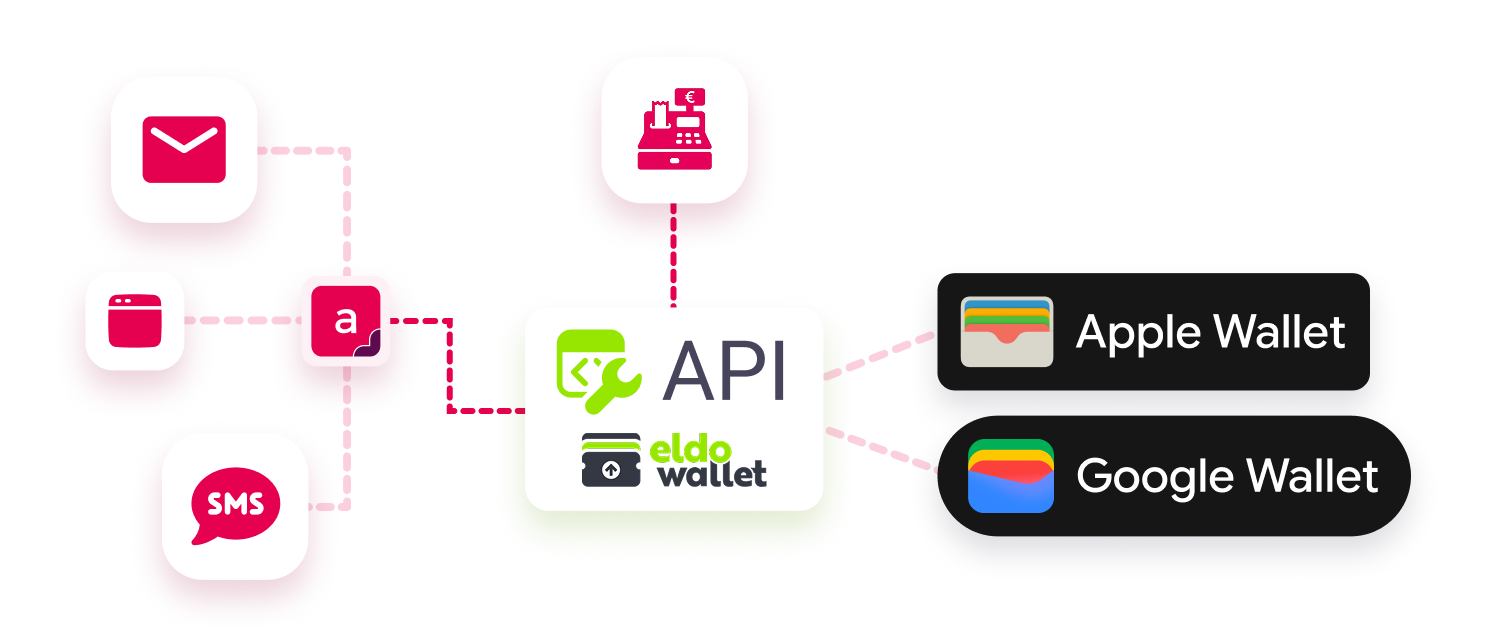
 Creating and initializing the wallet : from Webmecanik Automation to eldo wallet (Webmecanik Automation calls the eldo wallet API to initialize the account and retrieve the technical credentials).
Initial import of customers and physical cards : Webmecanik Automation (retrieving active customers and their data) into eldo wallet (mass import).
Updating Wallet cards on mobile (points, status) : from Webmecanik Automation to eldo wallet, then automatically updated on the customer’s phone.
Triggering push and location-based notifications : from Webmecanik Automation to eldo wallet (triggered via a Webmecanik Automation scenario and calls the eldo wallet notifications API, which orchestrates the sending to the cards).
Setting up physical stores and changing the card artwork : managed via Webmecanik Automation to eldo wallet.
Creating and initializing the wallet : from Webmecanik Automation to eldo wallet (Webmecanik Automation calls the eldo wallet API to initialize the account and retrieve the technical credentials).
Initial import of customers and physical cards : Webmecanik Automation (retrieving active customers and their data) into eldo wallet (mass import).
Updating Wallet cards on mobile (points, status) : from Webmecanik Automation to eldo wallet, then automatically updated on the customer’s phone.
Triggering push and location-based notifications : from Webmecanik Automation to eldo wallet (triggered via a Webmecanik Automation scenario and calls the eldo wallet notifications API, which orchestrates the sending to the cards).
Setting up physical stores and changing the card artwork : managed via Webmecanik Automation to eldo wallet.
Integration type : The addition is done manually and requires an API key from your Webmecanik Automation instance. You must have an eldo wallet account to use this integration.
games and events
Event management software with marketing automation
 CRM
CRM
CRM software with marketing automation
 webinar
Webinar software with marketing automation
 email marketing
Email marketing software with marketing automation
 web notification
Web notification software with marketing automation
 CRM
CRM
CRM software with marketing automation