
The importance of forms in lead capture
Steps to create a lead capture form
Consider progressive profiling
The importance of forms in lead capture
Would you like to integrate forms to help you with your lead capture strategy? But you don’t know how to go about it? So I’ll try to guide you in designing a good lead capture form.
Forms allow you to attract the attention of your prospects and visitors while trying to collect essential data about them. From a marketing perspective, you have every reason to integrate them into your strategies. The form is the entry point of an inbound marketing strategy as such!
The stronger and more compelling your promise is, the more your form will be submitted and the better your lead capture will be. It is an effective tool for collecting data, not only for your marketing campaigns, but also for effectively converting your leads into customers. By focusing the user’s attention on your offer, the form becomes a key element in your conversion funnel.
Steps to create a lead capture form
Creating lead capture forms can be done using builders—editor, in plain French—like the one offered by Webmecanik Automation. In addition to an effective builder, here are a few steps to follow to create a good form for capturing leads. ?
Define your objective
Before thinking about which fields to create and what the design of your form should be, it is recommended to set a clear objective for your lead capture form. Ask yourself: what is the ultimate goal you are trying to achieve? Is it to increase subscriptions to your newsletter, encourage the download of a white paper, or perhaps drive webinar registrations? Defining this objective is not just a formal step, it is the foundation on which your entire lead capture strategy rests. It is like choosing the right bait to catch the desired fish in the vast ocean of the web.
This clarification not only helps you tailor the form so that it is as attractive as possible to your target audience, but also to choose the fields to include, the ideal length, and the most persuasive calls to action (CTAs). Don’t forget. A well-thought-out form is like a good waiter in a restaurant. It knows your needs before you express them. This makes the experience pleasant and easy.
Design and layout
Aesthetics and visuals are essential when creating lead capture forms. You must choose an attractive design that is, above all, consistent with your brand identity and graphic charter. You can integrate graphic elements related to your brand image. But be careful not to lose sight of your main objective, which is to capture leads. I therefore advise you to create breathing spaces in your form. Think about prioritizing the elements you want to highlight. The visual hierarchy must be strategically designed in order to convey the message you want.
Number of fields
Too much information to fill in can discourage or drive away your internet users, so make sure to limit the number of fields you want to ask for. This allows you to make an initial selection by choosing only the fields most useful to your business and to what you want to leverage. For example, if you work in B2C: first name, last name and email should be enough to establish initial contact. For people in B2B, prioritize data such as: first name, last name, job title, company and email. Do not forget that the main objective of a lead capture form is to collect the first pieces of information necessary for your business. The marketing world seems to agree on a maximum of five fields on your form to ensure that you are not asking too much of your prospects and customers. In our last paragraph, we address progressive profiling. Do you know it? These are fields that hide or appear. It depends on the information already entered in the database. Thanks to the data you initially collected, you will be able to contact your prospects again in order to obtain new information.
Types of information to request
The type of information to request differs depending on your business sector. A company that works in B2B will not ask for the same information as a company that works in B2C, just as a company that sells a service will not ask for the same information as a company that sells products.
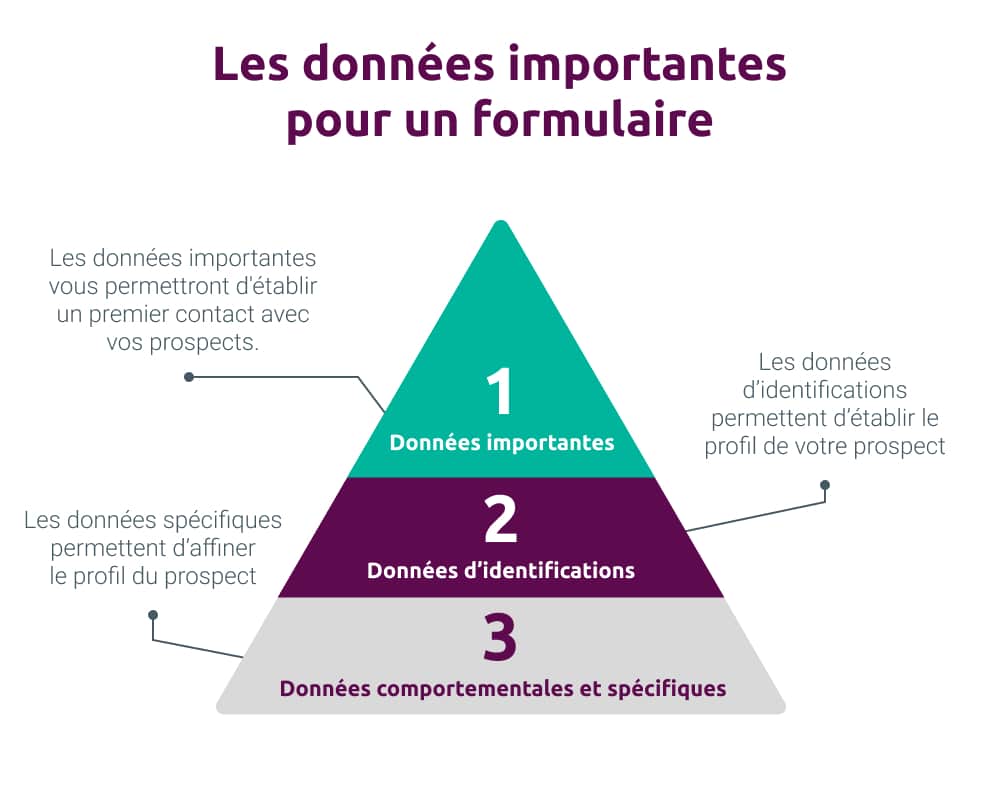
You must prioritize the type of information you want to collect in order to establish the data fields within your forms. I advise you to start by collecting key information. This will help you establish initial contact with your prospects. Next, focus on collecting specific data. This includes your prospect’s job title and company. Finally, to refine your prospects’ profile, you can ask them for specific information or information related to their behavior.
Use of colors and fonts
To make it easier for and encourage your users to provide their data, choose simple colors that are still in line with your graphic charter, so that your visitors find consistency throughout their user experience. Highlight the elements you consider important through colors, typography or even animations. The lead capture form must stand out from other content to attract your users’ attention.
Element layout
The first impression of your form is decisive. It is therefore essential to design your forms well to ensure a good impression. Make sure the form is easy to read, getting straight to the point, you must seek the information that interests you. As explained above, I suggest incorporating breathing spaces. Avoid adding distracting or unnecessary elements. This can divert your user’s attention or even drive them away. ? Adopt a simple and clear visual hierarchy to highlight your main message.
Integrating a call to action (CTA)
The call to action is the highlight of the show! It must be consistent with the objective you initially chose. It is the translation of that famous objective into an action verb or an engagement phrase such as “sign up for the newsletter” or “I get in touch”. Also, your call to action must remain consistent with your design. The CTA must be easily accessible and highlighted to encourage users to click on it. It is therefore essential to integrate calls to action to engage users on your form.
Create GDPR-compliant forms
If you want to create a relationship of trust with your users, you must create lead capture forms that comply with the GDPR. By respecting these standards, your visitors will be more inclined to provide you with their personal information. The information users provide you with is valuable, so you must protect it. Use form creation software that respects your users’ personal data. At Webmecanik Automation, this notably involves a consent checkbox.

Consider progressive profiling
Progressive profiling ? Progressive profiling in English! What is it?! ? Well, it’s quite simple. To make your forms easier to digest, consider implementing a progressive strategy. Start by asking for basic information, then move on to slightly more sensitive data, and finally to more confidential information. The information must always be useful to your marketing strategy. This step-by-step submission method makes the process smoother for the user. Having already provided simple initial information, they are more likely to share more delicate data afterward.
Integrating forms into your marketing strategy is an important step for your lead generation campaigns. A well-designed form allows you to attract attention, collect data and helps you increase your conversion and retention rates. By following the steps mentioned, you can create effective lead capture forms. With Webmecanik Automation, the creation process becomes more intuitive and aligned with your objectives. Our experts help you set up your marketing automation campaigns to ensure their performance. ?