The 6 reasons to integrate your CRM and Marketing Automation software
Building and maintaining a relationship of trust with your customers is a key challenge for your company’s success. The variety of customer journeys and complex platforms greatly complicate this customer relationship management. Since personal data is now the fuel for all growth, you lose a huge competitive advantage if you don’t master CRMs and other MarTech solutions (a contraction of Marketing and Technologies).
To help you make sense of it, I suggest distinguishing the differences between Marketing Automation and CRM, the advantages of each, and finally why and how they complement each other. And to wrap up, the six reasons why you must synchronize them perfectly.
More than 100 CRMs are synchronized with Webmecanik Automation. Salesforce, Microsoft Dynamics, Hubspot, Pipedrive, Sellsy, and many more.
The differences between marketing automation and the CRM
What is Marketing Automation
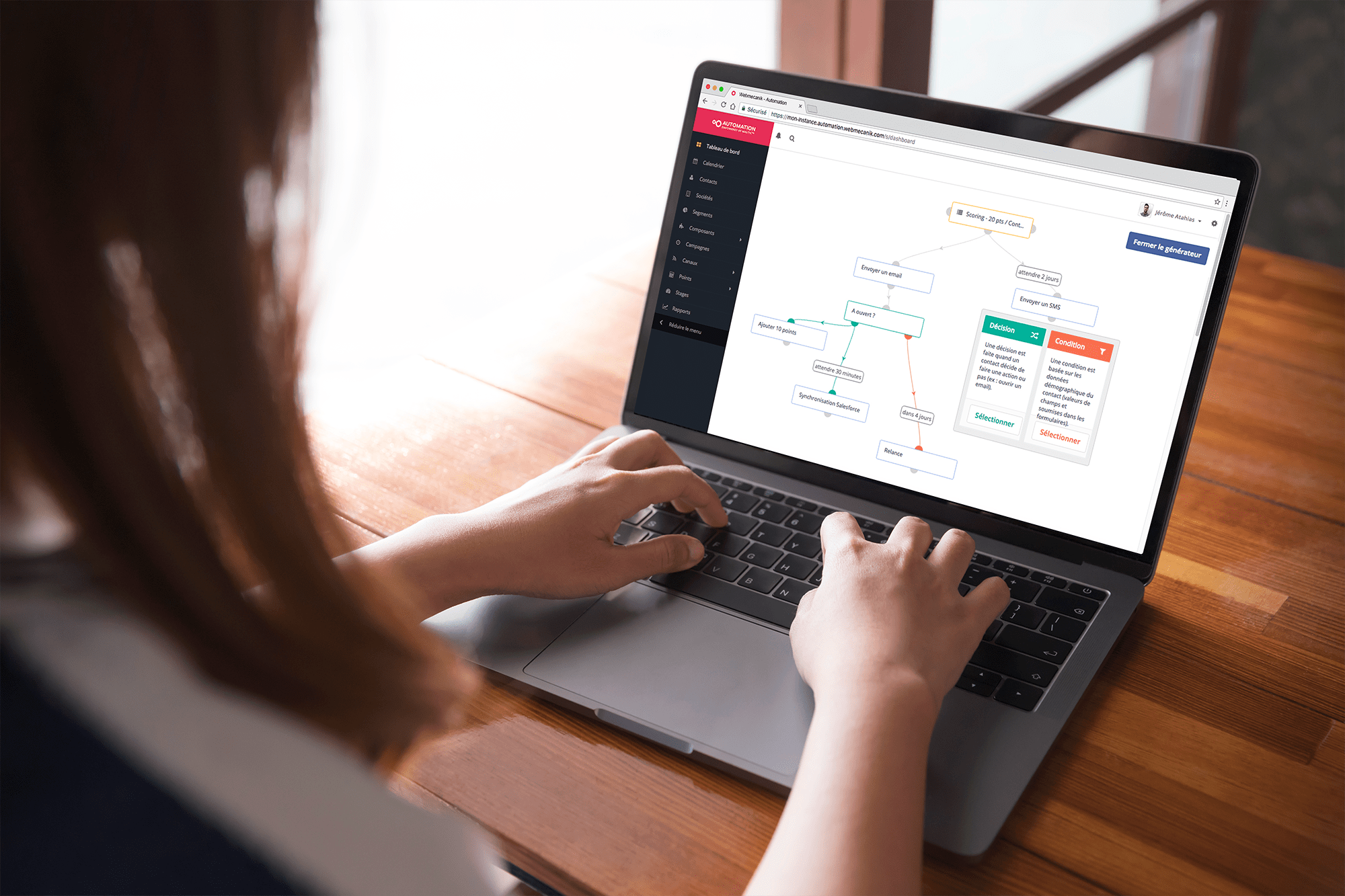
A Marketing Automation software allows you to send the right message to the right person at the right time. How? By segmenting contacts according to their behavior, scoring their level of maturity with respect to your topics, and automating actions to send personalized messages.
Marketing Automation manages your customers’ behavioral data.
Not only does it become difficult to carry out all your marketing activities manually without getting lost and devoting costly resources to it, but as with everything done manually, the margin for error is high. For example, launching a promotional campaign for products that your contacts have just bought at full price is a common mistake, caused in particular by the inability to update dynamic segments.
What differentiates Marketing Automation from the CRM is that you can track in real time the behavior of prospects who engage with your brand and analyze their data. This is how you automate hyper-personalized campaigns and give your customer service team information that enables them to engage the relationship at the right time with the right message.
Marketing Automation will execute your campaigns and repetitive tasks such as planning and sending marketing emails, as well as managing your many contact lists.
Marketing Automation is also very often used for lead research, autoresponders, and lead qualification with the goal of moving prospects forward through a predefined customer journey. But it’s important to know that many scenarios are possible, covering different touchpoints such as event organizations, trade shows, webinars, your FAQ page, the development of your ambassadors, or follow-ups for inactive contacts.
23 scenarios and KPIs that will boost your customer relationships and partners with the first book on marketing automation to grow your business.
What is Customer Relationship Management (or CRM)
The CRM is first and foremost a management tool. It’s software used to manage contacts, sales, and information about distributors and influencers. CRMs are increasingly becoming ERPs that also offer quotation, invoicing, and cash flow management modules. The CRM is a knowledge base of your customers’ historical data.
With a CRM solution, you can work analytically based on this history. Target your most profitable customers, work pricing based on your contact segments or on seasonal sales patterns, manage your customer service, forecast sales by geography, and more.
The customer relationship management software keeps a record of your customers and partners. It stores factual information such as email addresses or phone numbers, but also appointments and all actions carried out by your marketing, sales, customer success and support teams. Ideally, the most advanced of them also prevents manual data entry by capturing calls and other automatic data updates through the forms filled out by your contacts.
What’s the difference between Marketing Automation and CRM?
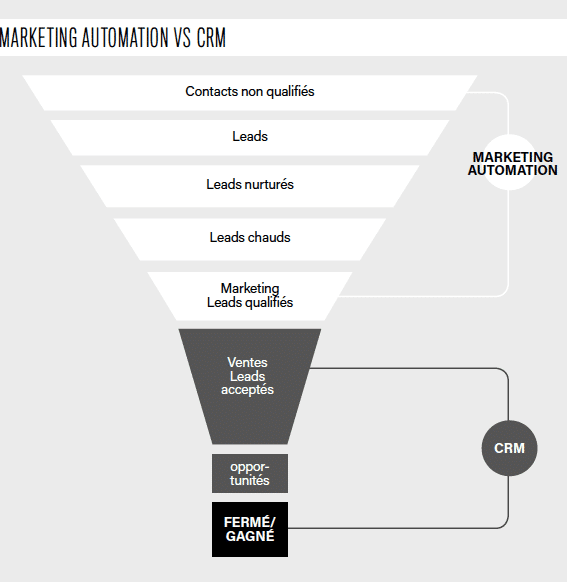
In short, Marketing Automation lets you automate your marketing campaigns using predefined conditions and triggers. It detects weak signals, compiles them to make them understandable and actionable for sales teams via the CRM.
The CRM helps you manage your sales processes and keeps your sales team organized thanks to a database. It automatically assigns tasks to salespeople as leads move through the sales funnel.
More generally, Marketing Automation is mainly used at the top of the funnel, while the CRM is dedicated to the bottom of your funnel.
The 6 reasons to integrate your CRM and Marketing Automation software
1 – Automated management of lists and segmentation
Your segments allow you to organize your contacts based on their interest, identified by the content (Marketing Automation) or confirmed through purchases (CRM).
Marketing Automation lets you manage your contacts based on their behavior, so you can immediately adapt the content of your campaigns. The CRM, in turn, uses this behavioral data to confirm (or not) coherence using information from sales and the contact’s history with your company.
If the behavioral information (MA) goes against the historical information (CRM), that becomes a weak signal that must be qualified quickly: call, invitation to lunch, or contacting partners and influencers in a complex B2B deal, re-qualification emails via rich, suitable content such as a video in B2C.
Not only does the CRM help you keep your lists up to date automatically, but it also prevents message or action inconsistencies that may be perceived negatively by your customers and prospects.
2 – Autoresponders and triggers
When you want to scale your commercial activity (Scalability is used to define the ability of an IT product to adapt to fluctuations in demand while retaining its various functionalities) without increasing your human resources, marketing automation is essential for hyper-simple tasks such as:
- Website visitor filling out a contact form
- Confirmation of an online order
- Newsletter subscription
- Booking an appointment
- Watching a product demo
- Signing up for a webinar or a trade show
Autoresponders will help you automate your confirmation emails and respond to customer actions instantly.
The 5 emails to automate right away to make your life easier and satisfy your customers
Triggers (scenarios that activate based on predefined action and/or scoring conditions) will engage your prospects when they are most interested in you quickly (automation) and usefully (personalization).
3 – Continuously qualify the data in your CRM
Having 100% of your CRM data up to date—a grail? Perhaps that’s a reality with Marketing Automation.
With all the automated actions based on your content, you’ll have a large amount of information about interests (topics, products, communication channels, best moments for interaction) that you’ll use to automatically update your customers’ segmentation, as well as their level of readiness in terms of how likely they are to take action.
In addition, if you place forms inside your videos and downloads of your main marketing resources such as white papers or use cases, you’ll also update contact details. Using progressive profiling, you automatically complete the data you already have about your contact; it fills in the rest, or corrects what is no longer up to date. And your salesperson no longer has to enter anything!
Tutorial – How and why to set up autocompletion of your contact forms.
4 – Your customers’ data speaks to you
Marketing is deciding based only on quantified and objective data.
Finally, you’ll have factual data linked not only to your customers’ history—such as purchases and order lead times—but also to their financial scoring provided by organizations like Euler or CreditSafe. And in addition, you’ll be able to dynamically combine it with their behavioral actions on your sites, your webinars, and even at trade shows.
For example, when a customer signs up for one of your events, you’ll nurture them with dedicated actions. A qualified appointment proposal if they showed up, and in the second case, a video replay of the conference.
By cross-referencing and analyzing your CRM and Marketing Automation data, you focus on the most important key performance indicators, making them easily accessible.
5 – Get a clear view of your customer journeys
Finally, marketing and sales teams can optimize their actions with a very precise idea of where a customer is in the sales funnel.
Mapping the customer journey is a process of visualizing how each interaction and contact is established between your company and your customers (current or future).
“Bring yourself closer than ever to your customers. So close that you tell them what they need before they realize it” – Steve Jobs, co-founder and CEO of Apple.
The CRM will inform you about transactions carried out by the customer, such as purchases, calls, or appointments made. Marketing Automation will inform you about all the actions they took without your intervention, and in what order. This way, you know the performance of your assets. You can even score differently a piece of content depending on which stage of the sales cycle it’s activated in. For example, a prospect who accesses a demo video (Marketing Automation information) will score 5 points; however, if it’s after they submitted a quotation (CRM information), they’ll score 50. In the first case, it’s simply a signal of interest added to other signals; in the second case, it’s proof that they almost chose you and that they (re)assure themselves about their choice. That’s therefore the right time to call them and close the deal!
6 – Make GDPR easier for yourself
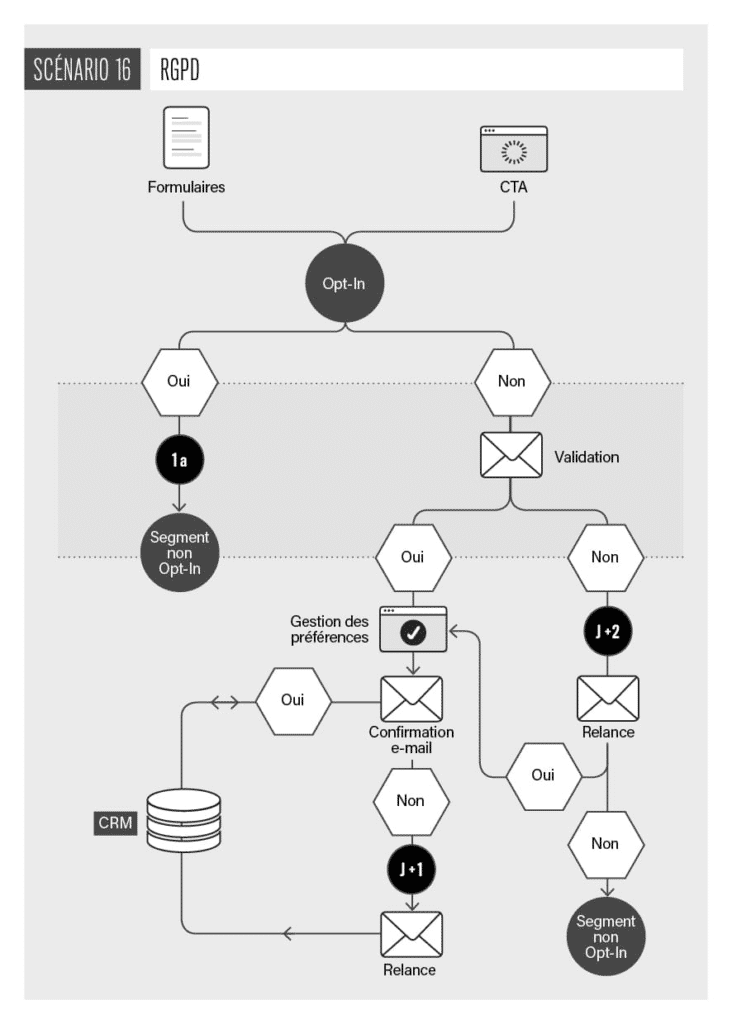
GDPR requires companies to collect only the necessary data, securely, and demonstrate responsiveness to requests from contacts. The individual’s consent is the basis for processing data. Each company must therefore obtain explicit consent (B2C) or implied consent (B2B) to use data. This practice aligns in every way with the spirit of inbound marketing, which aims to attract and not force the lead.
Finally, since you have all the data (historical thanks to the CRM and behavioral thanks to Marketing Automation) in one place, it will be very easy to grant access to the consumers and contacts who request it from you. The same goes for deleting it.
In addition, a double opt-in has a serious advantage: automatically re-qualifying the accuracy and correctness of your contacts’ email addresses. According to LinkedIn, professional email addresses change on average every 18 months… when someone changes companies, of course. Another great opportunity to congratulate your contact and qualify their new needs, but also to verify that in the company they just left, a new person has indeed arrived—someone you may need to train. A double opportunity to sell!
The comparison / benchmark to choose the right Marketing Automation solution.
So what now?
Now that you’re convinced of the usefulness of synchronizing your CRM and Marketing Automation solutions, you’ll need to implement a marketing and content strategy. Before getting started, I suggest this self-assessment, which will help you evaluate your Inbound & Marketing Automation performance. The personalized report will help you identify your areas for improvement and better define your action plan:
- You assess the performance of your Inbound & Marketing Automation practices in a few minutes
- You receive personalized advice to go further as you answer
- You get your score and receive the Inbound & Marketing Automation barometer in France