
Webmecanik Automation, your favorite marketing automation software, is upgrading to version 4! It is a great moment for our team ?.
Discover its functional improvements: tag management, interface improvement, reCAPTACHA V3 and the new landing page builder. It is a big step forward for our automation software which allows you to create custom tables and add a new dimension to your campaigns.
Tag management (contacts)
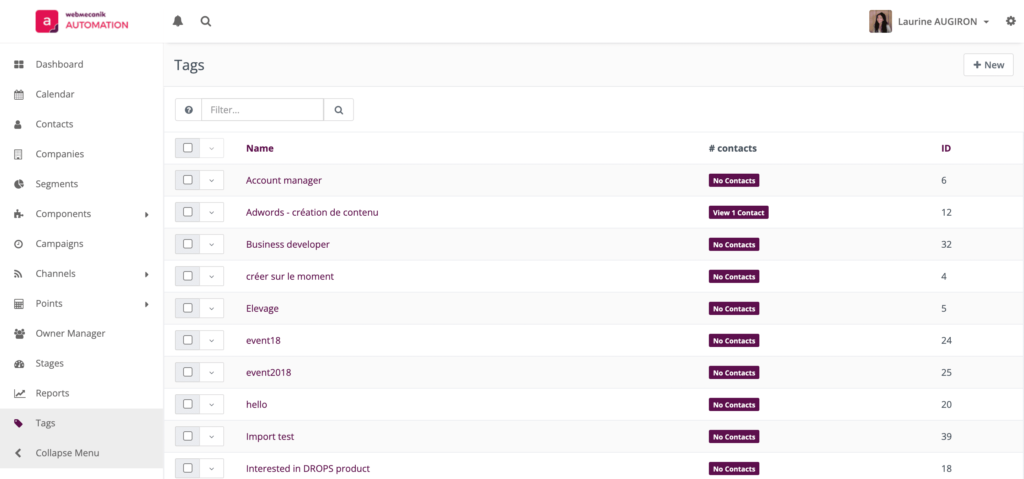
Managing tags in your automation software is now easier! A new menu was created to allow you to delete and visualize your tags and the number of contacts concerned.
Before:
- create a segment to see how many contacts had a specific tag
- no visualization of existing tags
Now:
- create and delete your tags
- see the number of contacts per tag and see the list of contacts
- add and modify a description to your tags
Why use tags?
Adding tags to your contacts allows you to quickly and easily segment your database based on flexible criteria.
The free but suggested input, allows you to enrich your data in a semi-structured way. This feature is very useful to manage punctual data that does not require the creation of a strict custom field.
Where to use tags?
You can use tags in your segments, forms, campaigns, statistics… This segmentation tool (that already existed but now has easy access) can be found in many features of your Webmecanik Automation software.
Our advice:
Even if the use of tags does not require a strict management like contact fields, we advise you to set up some rules to have a clear vision in the multiple tags you will create.
- Name your tag in a specific way. It has to be something understood easily by everyone. At Webmecanik, we use a specific nomenclature so all team members can understand the purpose of the tag.
- Fill in the tag description. It will give key information and context in one look to any user. It might be useful to indicate how your tag is assigned to a contact (form, campaign, manually…). It is precious information specially if you use tags in your campaigns.
- Do not create too many tags and make sure to delete those that are not used anymore.
Interface improvement
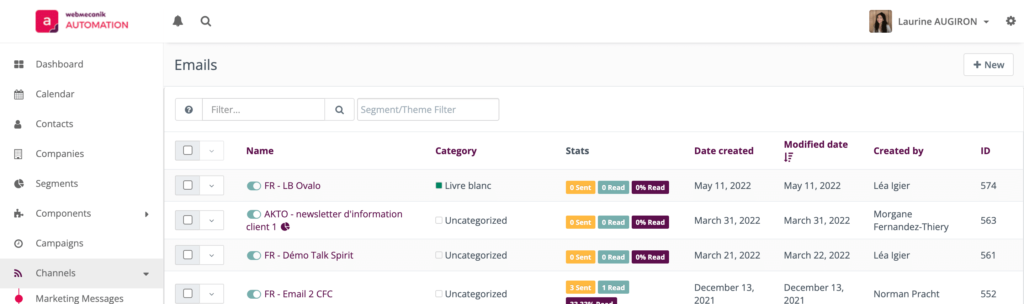
To have a better visibility of key information in your software, new columns have been added. You will find them in your segment lists, assets, landing pages and emails. You can now visualize and sort your items according to their creation and modification dates and to their creator.
Anti bot with Google reCAPTCHA V3
Webmecanik Automation now integrates Google’s reCAPTCHA V3 technology to minimize the impact of bots actions in your emails.
This feature was already available in the creation of your forms. This technology does not ask for any supplementary action to your visitors to prove they are not robots.
Careful: this new feature will probably impact the click statistics of your emails. Do not panic if your KPIs get lower in the next few weeks. We are the guilty ones but it is for your own good. Our objective is to provide you with the most accurate statistics possible!
Landing page builder
A new landing page builder is now available in Webmecanik Automation! ? Discover this new modern and complete interface to personalize your landing pages easily.
- responsive previsualization
- undo/redo
- new sections and blocks layout
- blocks personalization
To help you in the handling of this functionality, you will soon discover a complete tutorial to create your first landing page.
Create now your custom tables
Webmecanik Automation goes to the next level with a new advanced feature: custom table creation.
As it is possible to store data of your contacts and their company, you can now create new families of custom fields based on your company activity. Create tables that will be useful for you (products, orders…) and centralize your customers’ data in your marketing automation tool.
What are the benefits? You can now segment your database more precisely and go deeper in the personalization of your marketing actions for your customers.
If you want to set up this new feature, contact your account manager.