A quick reminder of the definition of a segment:
It is important to have a good command of segments in order to automate and personalize your marketing campaigns. Segments make it easier to create groups of prospects and customers for targeted and effective communication. Segmentation simplifies the sending of personalized emails. There are two types of segments: static and dynamic. If you would like techniques and advice on how to effectively segment your database and build customer loyalty, check out our page ! Here, we are going to talk about very concrete use cases for your segments in the Webmecanik Automation software.
Use static segments
Explanation + definition of a static segment
Static segments make it possible to define groups of contacts according to predefined criteria. In our marketing automation software, Webmecanik Automation, static segments can be created manually by the user. For example, you can manually add contacts to a specific segment, import contacts from another source, include contacts who have submitted a form, or those who have reached a certain stage in your marketing campaign.
Also read: Marketing tags: how do they enable effective organization of your marketing campaigns?
Updating static segments is done manually. It is up to you to change and/or modify them.
Example of using a static segment
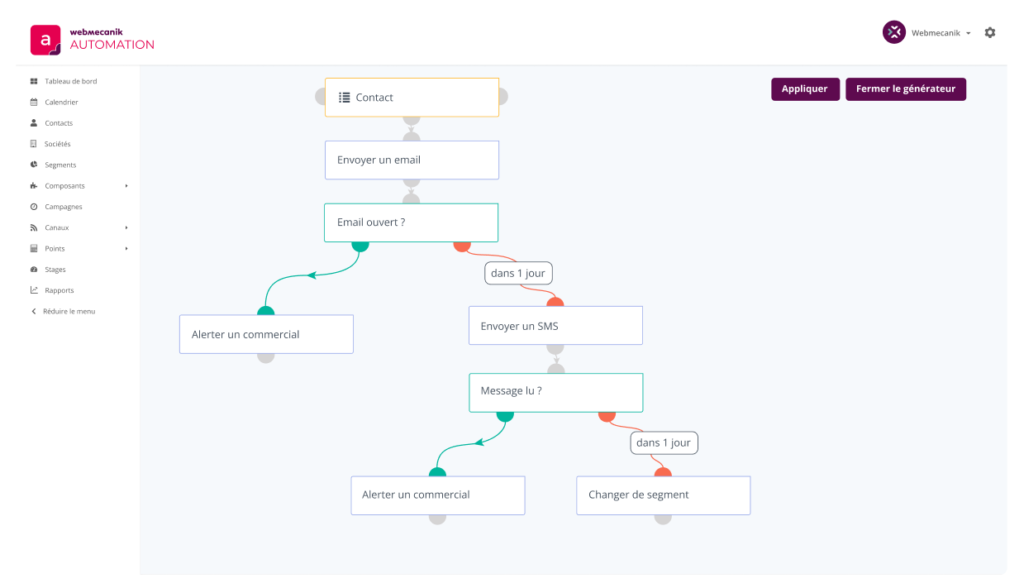
For your marketing automation campaigns, create static segments, which can be basic, such as, for example, “message read” “yes” or “no”. You can then adapt your nurturing campaigns according to your contacts’ actions. For example, in this scenario, a static segment containing contacts subscribed to a specific newsletter is used to launch a targeted campaign. If a contact opens the email, a signal is sent to a sales representative. If the email remains unopened after one day, an SMS is sent. If the SMS is read, the contact is alerted again and may be moved to a dynamic segment for personalized follow-up.
Company using segmentation with Webmecanik Automation
Discover how hyper-segmentation revolutionized the marketing campaigns of the company Virages. Virages decided to use Webmecanik Automation to meet their needs: segment their communications and leverage their many pieces of content to optimize their marketing actions.
Use dynamic segments
Explanation + definition of a dynamic segment
The other type of segment is the dynamic segment. It is populated automatically according to filters. There are filters on contact fields, company fields, and behavior.
We recommend using dynamic segments because contacts who meet the criteria automatically enter the segment, and when they no longer meet them, they automatically leave it. This means you no longer have to manage your distribution lists manually, and that is a huge time saver?! In addition, dynamic segments are updated automatically.
Also read: How to effectively segment a database: marketing techniques and tips
Example of using a dynamic segment
Let’s take the example of a city hall wishing to automate the sending of an email for Defense and Citizenship Day to 18-year-olds. They therefore set the “age” filter to 18 years old. The email will be sent automatically when a young person turns 18.
This is also the case for companies that sell an annual service. They may wish, for example, to send a renewal form to their database when the expiry date is approaching. They select the “end date” filter for the due date. The form will be sent automatically.
These are only examples; if you would like to know which segments match your situation, contact us !
Segmentation with Webmecanik Automation is essential for your customer relationship management, your customer loyalty efforts, and the automation of your marketing campaigns. Thanks to static and dynamic segments, you can target and automate all your campaigns for high-performing results.