Download this must-have guide to start your marketing automation journey.

Blog
Manage your documents easily in your CRM
2 min read

Manage your documents easily in your CRM

Add attachments to your CRM hassle-free?

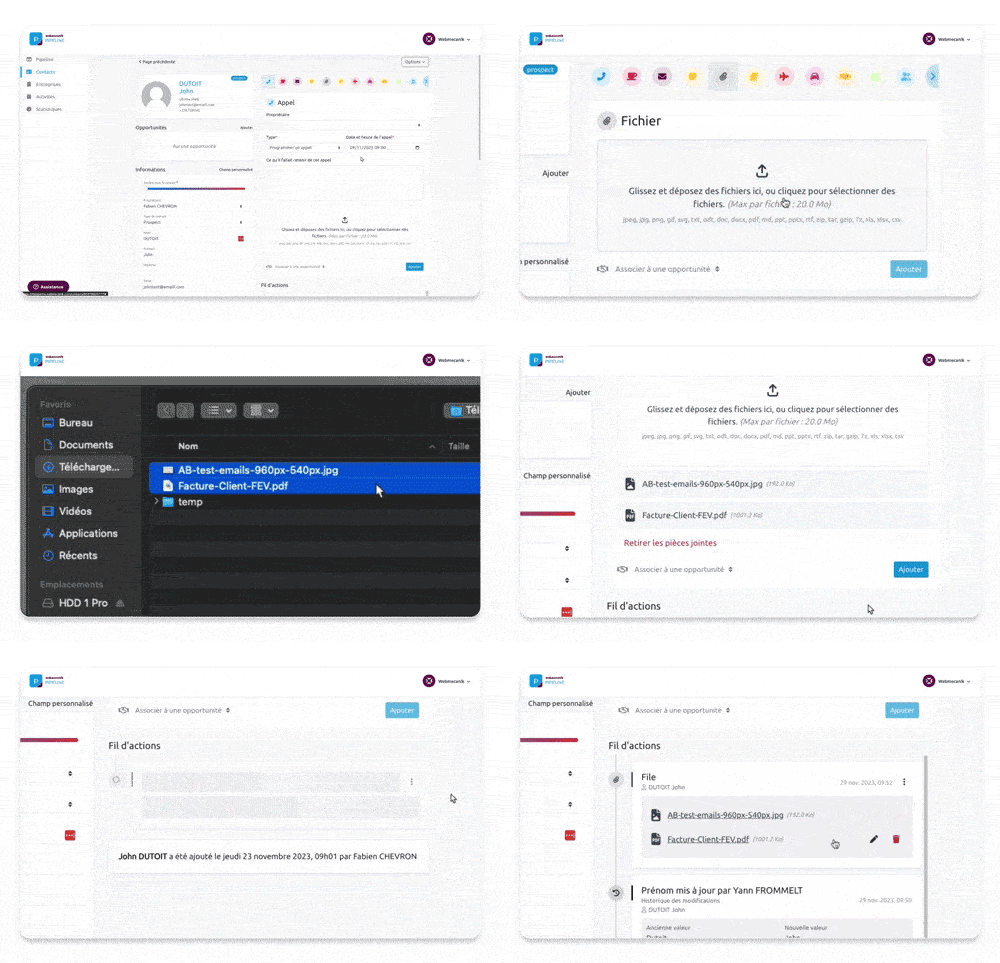
Using simple drag-and-drop or in one click, link a document by going to the relevant record. This is useful for attaching key information related to an ongoing opportunity, specific activities, or even a contact.

To attach a document to a contact, a company, or an opportunity, nothing could be simpler:

  • Go to your contact or opportunity record
  • Select the “File” activity, then add your files by clicking “Add”

Your documents will appear directly in your activity feeds at the different relevant levels: at the contact, company, and/or opportunity level.
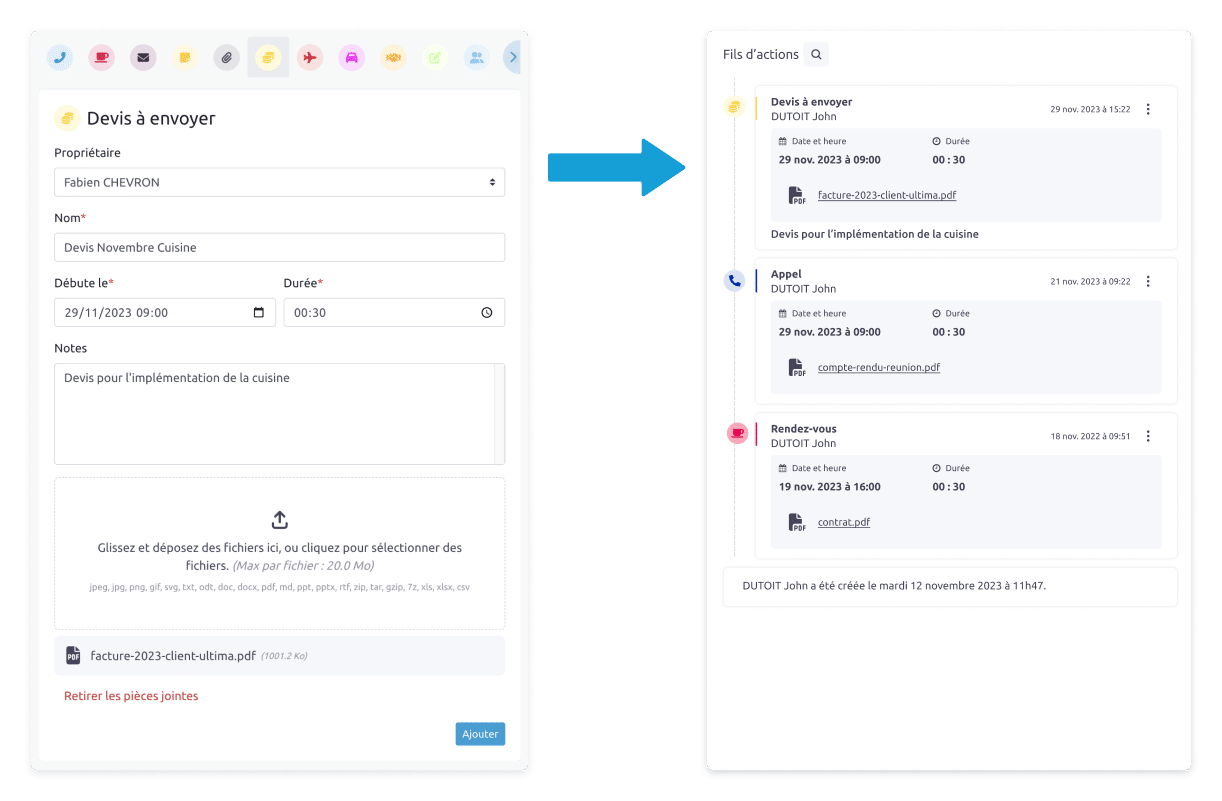
To attach a document to a specific activity, all you have to do is attach a document after filling in the required information to save an activity.

And there you have it, it’s done!

The benefits of managing your documents in your CRM

Your important documents are all in one place, just a click away. Everyone in your organization can access them based on their permissions, which improves collaboration within your team. 

Every document is available at any time, making it easier to track and organize your customer interactions as well as your decision-making.
document management pipeline

A small step for your CRM but a giant leap for your document management ?‍?

With this new update, integrating your documents into your CRM will save you a significant amount of time. You centralize as much information as possible so that your decision-making becomes child’s play! 

Spoiler alert: the next enhancement to your tool involves advanced filters for even more precise searching ?

Continue exploring articles

An intelligent summary of your sales opportunities 🪄

Discover our new intelligent opportunity summary feature to get a clear recap of the actions to take in just a few seconds.

Feature

CRM and marketing automation: how to (finally) align Sales and Marketing teams?

The opportunity no one asked for In 2025, the crisis of confidence persists in our economies. This crisis of confidence makes acquiring new customers long, complex, and uncertain. As in every crisis cycle of a system based on the continuous growth of sales of goods and services. In too many French companies, the pattern repeats […]

How to get the most out of a sales tour?

Introduction  Calls, emails, video calls… they work. But sometimes, nothing beats a handshake, a look, a real conversation. The figures speak for themselves: face-to-face meetings can increase the conversion rate by 25% compared with virtual exchanges, according to a study by RAIN Group. And according to IndustrySelect, a physical visit is 34 times more effective […]

Geolocate your contacts and companies in Webmecanik Pipeline

Are you spending too much time organizing your sales routes or identifying opportunities around your meetings? Good news! The new contact and company geolocation feature in Webmecanik Pipeline lets you visualize the geographic distribution of your prospects on a map, optimize your travel, and improve your sales efficiency. A new view to uncover your field […]

Release – Automatic Address Filling: More Reliable Data in Just One Click!

We have good news for all Webmecanik Pipeline users: manual address entry is now a thing of the past. With our new smart address autofill feature, entering postal addresses for your contacts and companies is faster, cleaner, and free of errors. 4 Concrete Benefits for Your Daily Work A Feature That Benefits Everyone! 4 Concrete […]

Advanced Filters: get a clear and precise view of your data

Advanced filters, already available for your contacts and companies, now extend to your CRM opportunities. With advanced filters, you can refine all your data by the fields and criteria most relevant to your business. But that’s not all! With just a few clicks, you can set up your search filters and save them for easy […]